Voice
The Voice inbox is a phone-call channel. It gives your account a phone number, and agents answer and place calls from a browser softphone — a small popup window — instead of a physical desk phone. Every call becomes a conversation, so a call sits in the same inbox and on the same customer record as chats and emails.
Voice is a call channel, not a text channel. Voice conversations have no reply box — a conversation is a record of the call (with notes, recording, and history). Agents talk to customers through the softphone.
Prerequisites
Voice depends on a few things being set up at the account and agent level (outside the inbox itself):
| Requirement | Where it's set |
|---|---|
| Voice enabled for the account | An account-level master switch must be on. If it's off, adding a voice inbox or making calls returns "Voice is disabled for this account." |
| An available phone number | Voice numbers come from a Teloring-managed pool. You pick an available number when you create the inbox. |
| Voice-enabled agents | Each agent who will handle calls must be enabled for voice (which sets up their calling credentials). There's also a Reset voice credentials action to rotate an agent's credentials. |
| Inbox permission | Creating a voice inbox needs My Ring → Create. Switching browser calling on for a person is Agents → Update. See Roles and Permissions. |
Create a voice inbox
Open My Ring, click the Voice icon, and choose Add.
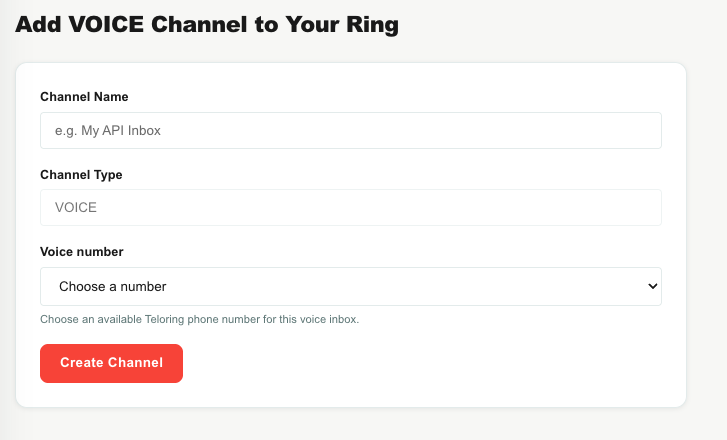
| Field | What to do |
|---|---|
| Channel Name | Name the line (for example, Main Line or Support Line). |
| Voice number | Choose an available Teloring phone number from the dropdown (shown in a friendly format like +972 73-398-3300). |
Click to create the inbox. Teloring claims the number for your account (two admins can't grab the same one) and the inbox goes live. If no numbers are free, you'll see "No available voice numbers. Contact support."
Deleting the inbox releases its number back to the pool.
Inbox properties
A voice inbox carries these properties, set when it's created:
| Property | Default | Meaning |
|---|---|---|
| Auto-resolve | On | The conversation closes itself when the call ends, so agents don't manually close completed calls. (Missed calls stay open for follow-up.) |
| Recording | Off | The default for call recording. Whether a specific call is recorded is controlled by your Studio call flow. |
| Business hours | Default schedule | Which reusable schedule (open/closed hours, timezone, holidays) the call flow uses to decide how to route calls. |
| Agent extensions | — | Which agents can receive calls forwarded from this line. |
Voice behavior — greetings, menus, business-hours routing, forwarding to agents, and recording — is built in a Studio call flow attached to the number, not in a settings tab on the inbox. The inbox's edit page shows its name and a delete option; day-to-day call handling is defined by the flow.
Capabilities
| Capability | Detail |
|---|---|
| Inbound calls | A customer dials your number; the call runs through your Studio flow and can ring an agent's browser. |
| Outbound calls | An agent places a call from the voice line to an external number. |
| Internal calls | Agents can call each other, browser to browser. |
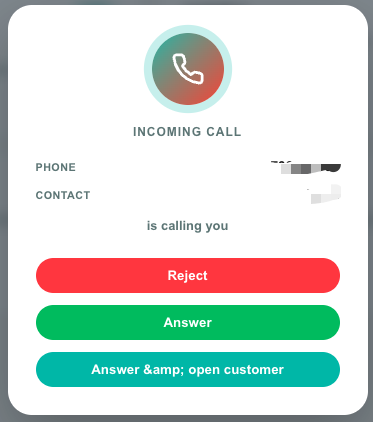
| Browser softphone | A popup window with Mute, Hold, Hang up, and (for incoming calls) Answer controls. Keep it open for the duration of the call. |
| Call recording | Recordings are saved and attached to the conversation, controlled per-call by the Studio flow. |
| AI Copilot | Available on calls. |
| Live call state | The call card updates in real time as the call rings, is answered, held, and ends. |
How calls become conversations
Unlike messaging channels, each call is its own conversation (even repeat calls from the same number).
- Inbound: when a customer dials your number, Teloring finds the inbox, matches or creates the contact (unknown callers become a lead), creates the conversation, and runs your Studio flow. A ringing call card appears in the agent inbox.
- Answered calls auto-resolve when they end (if auto-resolve is on).
- Missed calls stay open and get an automatic private note like "Missed call from 050-773-0018 at 14:32." so they can be followed up.
- Outbound calls create a conversation the same way, assigned to the agent who placed the call.
Every contact profile has a permanent Phone calls section listing all of their voice conversations. See Conversations.