On Hold
On Hold parks a conversation until a time you choose. The customer asked you to call back after lunch, you are waiting for a delivery to arrive, a colleague has to check something tomorrow morning — put the conversation on hold and stop thinking about it. Teloring brings it back on its own.
It comes back in two ways, whichever happens first:
- The time is up. Teloring returns it to your queue and marks it unread.
- The customer writes again. The hold ends immediately — even at 2 minutes into a 5-hour hold.
That second rule is the important one. A customer who says "call me in five hours" and then writes back in twenty minutes should be in front of you now, not asleep until the deadline.
On Hold is a top-level conversation status, next to Open and Resolved — not a sub-state of Open. A conversation on hold disappears from Mine, Waiting in line, Studio Bot, AI Agent and All Open, and stops counting in your dashboard numbers. That is the whole point: parked work must not sit in your active list creating false urgency.
Key facts
| Fact | Meaning |
|---|---|
| It keeps its owner | The conversation stays assigned to you. When it comes back, it comes back to you, not to the general queue. |
| It has its own queue | Conversations → On Hold in the sidebar, at the same level as Mine and Waiting in line. |
| The queue is account-wide | Every agent sees every held conversation, like All Open. Filter by Assigned agent to see only yours. |
| A customer reply cancels it | On every channel, and without you being online. |
| The timer is accurate to about a minute | Teloring checks for expired holds once a minute, so a conversation returns within roughly a minute of its deadline. |
| Deadlines use the business timezone | Not your personal one. See Which timezone is used. |
| Resolved conversations cannot be held | Reopen it first. A hold on a closed conversation would mean nothing. |
| It is recorded | Entering and leaving a hold appear in the conversation's timeline and in the account audit log. |
When to use it
| Situation | Why On Hold fits |
|---|---|
| "Call me back this afternoon." | The conversation returns at the time you agreed, without a personal reminder or a sticky note. |
| Waiting on a delivery, refund, or repair | Park it for a realistic date instead of re-reading it every hour. |
| Waiting on a colleague or another department | It leaves your active list but stays yours, so nothing is dropped. |
| The customer is unreachable right now | Try again tomorrow morning without losing the thread. |
| A promise with a date on it | "We'll check on Sunday" becomes something the system remembers, not something you have to. |
When not to use it:
| Situation | Do this instead |
|---|---|
| The issue is finished | Resolve it. On Hold is for work that is still open. |
| Somebody else should handle it | Send back in line or assign it to an agent or team. |
| You need the whole team to see it is blocked | Add a label or a flag as well — the On Hold queue shows the deadline, but a label explains why. |
Put a conversation on hold
Open the conversation and use the On Hold button in the top bar, next to Resolve.

That opens the duration picker.
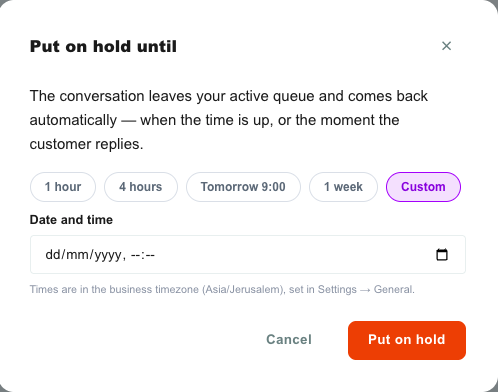
The duration picker
| Element | What it does |
|---|---|
| 1 hour | Comes back one hour from now. |
| 4 hours | Comes back four hours from now. |
| Tomorrow 9:00 | Comes back at 09:00 the next calendar day, in the business timezone. |
| 1 week | Comes back seven days from now. |
| Custom | Reveals a date-and-time field so you can pick any moment. |
| Date and time (Custom only) | The exact return time. Read in the business timezone. |
| Timezone note | Names the timezone the times are calculated in, so there is never a silent mismatch. |
| Put on hold | Confirms and parks the conversation. |
| Cancel | Closes the picker and changes nothing. |
A custom time must be at least one minute away and no more than 365 days away. Anything outside that is rejected with a message in the picker, and the conversation is not touched.
What happens the moment you confirm
- The conversation's status becomes On Hold.
- It leaves whichever queue you were looking at, and the chat panel closes.
- It appears in the On Hold queue for everyone in the account.
- It stays assigned to you.
- Everyone else's screen updates immediately — no refresh needed.
On Hold does not release ownership. This is not "send back in line with a timer" — it is "come back to me later".
The On Hold queue
Open Conversations → On Hold in the sidebar. The badge counts every held conversation in the account, and is hidden when nothing is on hold.

In the list itself, each row carries a ⏸ deadline chip, so you can scan the queue and see what is waking up when.
| Element | What it shows |
|---|---|
| Sidebar badge | How many conversations in the account are on hold. Hidden at zero. |
| ⏸ chip on a card | When that conversation is due back, in your display timezone. |
| Search, sort, filters | Work exactly as in the other queues. |
| Assigned agent filter | Use it to narrow the queue to your own held conversations. |
The queue is account-wide on purpose — a supervisor needs to see what the team has parked. To see just yours, open the Filter panel and pick yourself under Assigned agent.
Opening a held conversation works normally: you can read it, add a private note, change labels, and even reply. Replying does not end the hold — only the three triggers below do.
How a hold ends
1. The time is up
Teloring checks once a minute for holds that have expired. When one has:
| What changes | Detail |
|---|---|
| Status | Back to Open. |
| Assignment | Unchanged — it returns to the same agent. |
| Unread | Marked unread, so it stands out in the list. |
| Queue | Leaves On Hold, reappears in Mine for its owner and in All Open. |
You do not need to be online. If the hold expires overnight, the conversation is waiting, unread, when you sign in.
2. The customer replies
If the customer sends anything before the deadline, the hold ends at once:
- the conversation returns to Open, still assigned to you;
- it reappears in Mine and All Open with the new message;
- the deadline is discarded.
This works on every channel — WhatsApp, Email, SMS, Telegram, LINE, Live Chat, Messenger, Facebook and Instagram, TikTok, and the API inbox — and it happens on Teloring's side, so it does not depend on anyone having the app open.
A customer writing to a held conversation continues that conversation. Teloring does not start a second one alongside it.
A WhatsApp reaction counts as the customer speaking, so it also ends a hold. Removing a reaction does not.
3. You end it yourself
While a conversation is on hold, the top-bar button changes to On hold until … and becomes the release control. Because that label does not announce that clicking it undoes the hold, Teloring asks first, in a small confirmation next to the button.
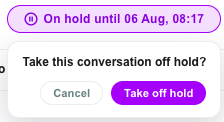
| Element | What it does |
|---|---|
| On hold until … (button) | Shows the deadline. Click to start taking it off hold. |
| Take off hold | Returns the conversation to Open immediately. |
| Cancel | Leaves the hold as it is. |
Pressing Esc or clicking anywhere outside also cancels.
Released this way, the conversation goes back to Open with the same owner. It is not marked unread — you are already looking at it.
Resolving or reopening also clears it
If you Resolve a held conversation, or move it to another status, the hold is dropped in the same action. A closed conversation can never be woken up by an old timer.
Change a deadline
To move a deadline, take the conversation off hold and put it on hold again with the new time. There is no "extend" control in the picker.
Which timezone is used
Two different timezones exist in Teloring, and On Hold uses both — for different jobs.
| Timezone | Where it is set | What it does for On Hold |
|---|---|---|
| Business timezone | Settings → General (admin) | Calculates the deadline. "Tomorrow 9:00" means 09:00 for the business, so two agents in two countries parking the same conversation get the same moment. |
| Your display timezone | Profile → Personal Information | Displays the deadline. It changes what you read on the button and the ⏸ chip, never when the conversation actually returns. |
Leave your profile timezone empty and Teloring shows times in your browser's own timezone, which is what most agents expect.
This is the same principle as business hours, SLA windows and report periods: they all follow the business timezone. If your personal timezone differs from the business one, the picker's note tells you which zone the times are in — read it before choosing a custom time.
Example. The business timezone is Asia/Jerusalem and you work from London. You pick Tomorrow 9:00. The conversation returns at 09:00 Jerusalem time, which your screen shows as 07:00 — correct in both places, and the same instant for everyone.
Permissions
| Action | Who can do it |
|---|---|
| Put a conversation on hold | The assigned agent, or an Admin. |
| Take it off hold | The assigned agent, the agent who parked it, or an Admin. |
| See the On Hold queue | Every agent in the account. |
A conversation that nobody owns — sitting in Waiting in line, or held by Studio Bot or an AI Agent — can only be put on hold by an Admin. Normally you would take the conversation first, then hold it.
These rules are enforced on the server, not only hidden in the interface.
On Hold and the rest of Teloring
| Feature | Behavior |
|---|---|
| Dashboard | Held conversations are excluded from the Mine and Waiting counters, so parked work does not inflate your workload. |
| Conversation timeline | Entering and leaving a hold appear in the resolved conversation's timeline, including how long it was held for and why it ended (timer or customer reply). |
| Reports | Conversations can be filtered by the On Hold status in Analytics. |
| Audit log | Every hold and every release writes an entry — who parked it, until when, and what ended it. A release by the timer is recorded as a system action. Releases caused by a customer reply are recorded on the conversation itself, not in the audit log, because they happen on the busiest path in the platform. |
| AI Copilot | Still available inside a held conversation. On hold means parked, not closed. |
| Studio | A Conversation Changed trigger fires when a conversation enters or leaves a hold. The trigger's status filter offers any, opened and resolved only, so use any and read the conversation's status inside the flow. |
| Webhooks | Emits conversation.on_hold and conversation.on_hold_released. |
The Studio Change Conversation action can set Open, Pending or Resolved — not On Hold. A hold carries a deadline and an owner, so it is an agent action.
Limitations
| Limitation | Detail |
|---|---|
| No extend | Change a deadline by releasing and re-holding. |
| No per-agent queue | The On Hold queue is account-wide; use the Assigned agent filter to narrow it. |
| Maximum 365 days | Longer than that is rejected. |
| Minimum one minute | A time in the past, or less than a minute away, is rejected. |
| Not settable from Studio or the AI Agent | Agents (or an Admin) put conversations on hold. |
| Replying does not release | Only the timer, a customer reply, or an explicit release ends a hold. |
| Resolved conversations cannot be held | Reopen first. |
Troubleshooting
| Symptom | Cause and fix |
|---|---|
| A held conversation did not come back at its deadline | Holds are swept once a minute, so allow about a minute. If it is much later than that, contact your administrator — the platform's minute schedule may not be running. |
| The time I picked is not the time shown on the button | The deadline is calculated in the business timezone and displayed in your timezone. Both are correct. See Which timezone is used. |
| The On Hold button is missing | The conversation is resolved. Reopen it first. |
| "Reopen the conversation before putting it on hold" | You are on a resolved conversation. |
| "Only the assigned agent or an admin can put this conversation on hold" | Take the conversation first, or ask an Admin. |
| "Pick a time at least a minute from now" | The custom time is in the past or too close. |
| A customer replied but the conversation is still on hold | Reload the page. If it persists, the message may not have reached Teloring — check the inbox connection in The Ring. |
| I cannot find my held conversations | They are in Conversations → On Hold, not in Mine. Filter by Assigned agent to see only yours. |
Related
- Conversations — the queues, filters, and everyday handling workflow.
- Teams — routing conversations to a group instead of one person.
- Settings — where the business timezone is set.
- Analytics — reporting on conversation statuses.