Achievements
Achievements turn everyday milestones — connecting your first channel, building an automation, growing your team — into free top-up credits you can spend anywhere in Teloring. Every time your account reaches a goal, a reward becomes ready to collect. Click Collect and the credits land in your balance.
Think of it as a loyalty program built into the product: the more you set Teloring up and use it well, the more credits you earn.
The credits an achievement pays out are top-up credits — the same kind you can buy on Billing → Recharge, valid for a year and spent only after your monthly plan allowance runs out. See Credits & Recharge for how the two balances work together.
Open Achievements from the Tools section of the sidebar (just below AI World).
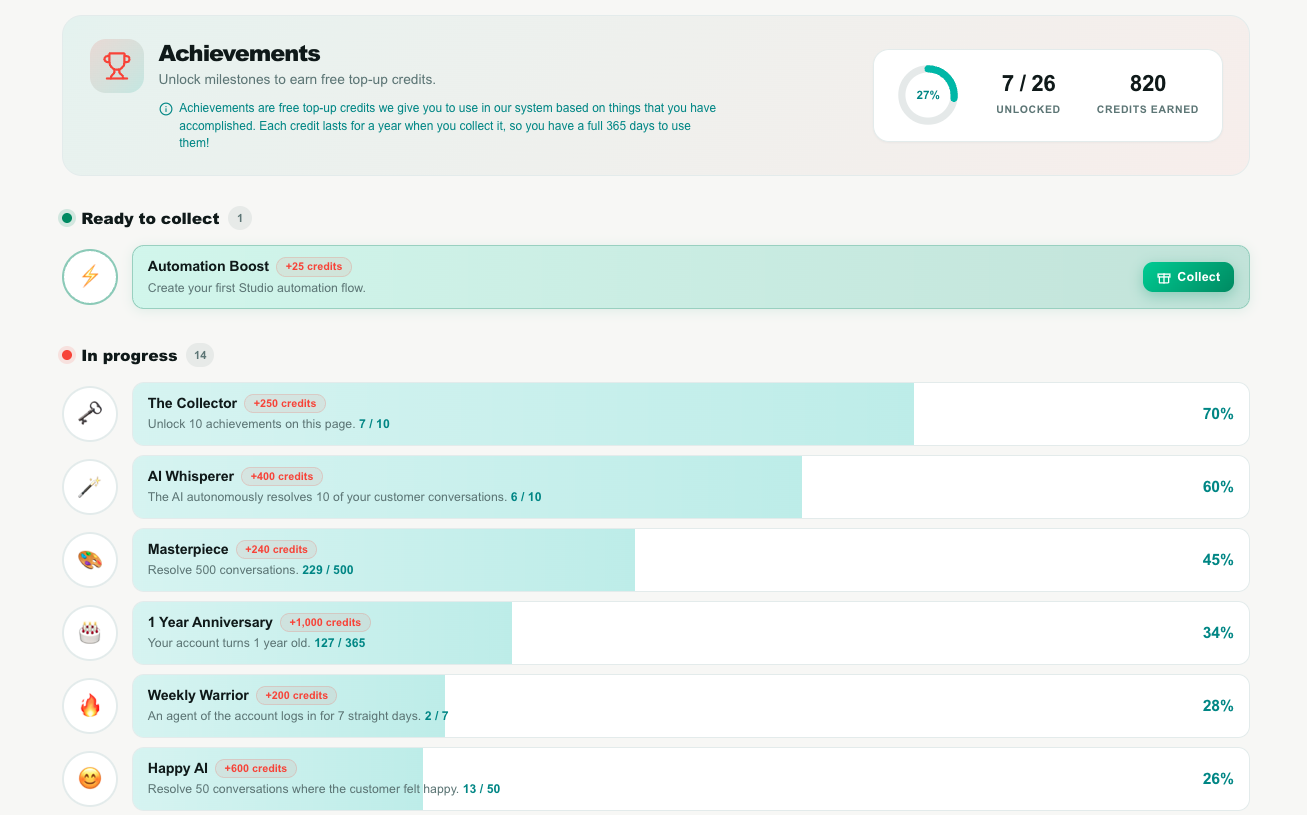
Key facts
| Fact | Meaning |
|---|---|
| Rewards are credits | Each achievement pays out top-up credits into your account balance. Credits are the currency Teloring uses for messaging, AI, and other metered features. |
| Credits last 365 days | Collected credits are added to your top-up bucket and expire one year from the day you collect them. Collect them when you're ready to use them. |
| One-time per account | Each achievement can be collected once per business account — not once per agent. Whoever clicks Collect first claims it for the whole account. |
| Account-wide progress | Progress is measured across your entire account. If any agent connects a channel or resolves a conversation, it counts toward the account's achievements. |
| Server-verified | The system checks the real criteria on its own servers before granting a reward. You can't unlock a reward you haven't actually earned, and the Collect button only appears once you qualify. |
| Any agent can collect | There is no admin restriction — any signed-in agent on the account can collect a ready reward on the account's behalf. |
| Some are Coming soon | A few achievements are shown as placeholders for features still being built. They're visible so you know what's ahead, but can't be collected yet — see Coming soon. |
The Achievements page lists reward milestones for a single Teloring account. Each achievement has a code, an icon, a name, a description of how to earn it, and a credit reward. An achievement moves through states: In progress → Ready to collect → Collected. Rewards are paid as top-up credits with a 365-day expiry, granted once per account, and always verified server-side at the moment of collection.
The summary header
The top of the page gives you an at-a-glance snapshot of how far you've come.
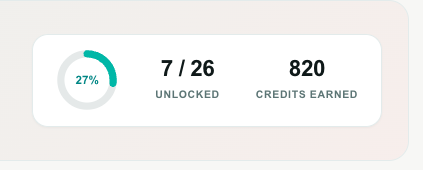
| Element | What it shows |
|---|---|
| Completion ring | A circular progress meter with a percentage in the middle — how many of the total achievements you've unlocked. |
| Unlocked | A count like 7 / 26 — achievements collected out of the total available. |
| Credits earned | The running total of top-up credits you've collected from achievements so far. |
| Notice line | A short reminder that these are free credits, valid for a year from collection. |
The four sections
Below the header, achievements are grouped by state so you always know where to look. Each section only appears when it has at least one achievement in it, and shows a count next to its title.

| Section | Colored dot | What's inside | Can you act? |
|---|---|---|---|
| Ready to collect | Green | You've earned these — the reward is waiting. | ✅ This is the only section with a Collect button. |
| In progress | Blue | Not earned yet. Shows a progress bar and a current / target count where it applies. | No button — keep using Teloring to fill the bar. |
| Collected | Purple | Already claimed. Shows the date you collected each one. | Nothing to do — the credits are already in your balance. |
| Coming soon | Grey | Placeholder achievements for features still being built. | Not collectable yet — see Coming soon. |
The In progress section is sorted so the achievements closest to completion appear first — the ones you're about to unlock rise to the top.
Anatomy of an achievement row
Every achievement is a single horizontal row, styled like a game-console trophy bar.

| Part | What it is |
|---|---|
| Icon (left) | An emoji badge that represents the achievement. |
| Progress bar (the wide fill) | The colored fill shows how close you are. It's empty while locked, partly filled while in progress, and full once ready or collected. |
| Title | The achievement's name. |
| Reward tag | The credits you'll receive, e.g. +150 credits. Hidden achievements show a ? instead. |
| Description | A plain-language line telling you exactly how to earn it. |
current / target count | For measurable goals (e.g. resolve 500 conversations) this shows your live progress, such as 120 / 500. |
| Right side | Changes with the state — a Collect button, a Collected ✓ stamp with a date, a % figure, a Soon label, or a ? for hidden challenges. |
What the right side means
| Right-side state | Meaning |
|---|---|
| Collect button | Earned and ready — click to claim your credits. |
| Collected ✓ + date | Already claimed on the shown date. |
percentage (e.g. 40%) | In progress — how far along you are. |
| Soon | A Coming-soon placeholder; not available yet. |
| ? | A hidden challenge (see The hidden Easter Egg). |
Collecting a reward
- Find an achievement in the Ready to collect section.
- Click Collect.
- A celebration pops up confirming the achievement and the credits awarded.
- The credits are instantly added to your top-up balance, and the achievement moves to the Collected section.
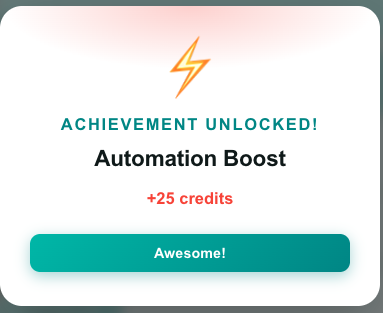
There's no penalty for waiting, but remember credits start their 365-day countdown the moment you collect. If you're not going to use them soon, it's fine to leave a reward as "Ready" until you need it.
If two agents on the same account click Collect on the same achievement at the same instant, only one will succeed — the reward is granted once per account. The second click will show "You already claimed this achievement," which is expected.
The full achievement list
Here's every achievement, what it takes to earn it, and its reward. Rewards shown are the defaults — an account can have custom reward amounts set by Teloring.
Getting set up
| Icon | Achievement | How to earn it | Reward |
|---|---|---|---|
| 📞 | First Ring | Connect your first WhatsApp channel. | 40 |
| 🌐 | Omnichannel Rookie | Connect 3 different channel types (e.g. WhatsApp + Email + Telegram). | 50 |
| 📚 | Knowledge is Power | Upload your first document to the Knowledge Base. | 30 |
| ⚡ | Automation Boost | Create your first Studio automation flow. | 25 |
| 🧱 | CRM Builder | Build your first object of your own under Objects. | 150 |
| 🚀 | We Are ALIVE! | Connect a Live Chat widget to your website and receive your first message on it. | 100 |
Growing your team & usage
| Icon | Achievement | How to earn it | Reward |
|---|---|---|---|
| 🪑 | Seat Expander | Have 3 agents total on the account (you + 2 more). | 150 |
| 👥 | Team Player | Have 5 agents online at the same time. | 300 |
| 🔥 | Weekly Warrior | Any agent on the account logs in 7 days in a row. | 200 |
| 🎓 | Knowledge Master | Upload 50 documents to the Knowledge Base. | 300 |
| 🎨 | Masterpiece | Resolve 500 conversations. | 240 |
| 🦉 | Night Owl | Resolve a conversation at 3am your local time. | 50 |
| 📝 | Note Taker | Add your 100th internal note (the private "Note" tab inside a conversation). | 150 |
| ✍️ | Sealed & Signed | Have 10 documents signed and completed by clients through Documents Signature. | 150 |
Loyalty & value
| Icon | Achievement | How to earn it | Reward |
|---|---|---|---|
| 💎 | Believer | Upgrade from Free to any paid plan. | 500 |
| 💳 | Topped Up | Buy your first credit package on Billing → Recharge. A gifted or achievement-earned package does not count — this one is for a purchase you paid for. | 100 |
| 🎂 | 1 Year Anniversary | Your account turns 1 year old. | 1,000 |
| 🏆 | 3 Years Loyalty | Your account turns 3 years old. | 2,000 |
| 🗝️ | The Collector | Unlock 10 achievements on this page. | 250 |
AI-powered
| Icon | Achievement | How to earn it | Reward |
|---|---|---|---|
| 🤖 | AI Master | Let AI Copilot help you (tips, suggestions, insights) on 10 conversations. | 100 |
| 🪄 | AI Whisperer | The AI autonomously resolves 10 of your customer conversations. | 400 |
| 😊 | Happy AI | Resolve 50 conversations where the customer felt happy. | 600 |
| 🪃 | Boomerang | The same customer returns 10 times within 3 months. | 300 |
The four AI achievements only make progress when the matching feature is switched on in AI World:
- AI Master needs at least one live‑conversation helper enabled — Copilot Tips is the usual one. It counts conversations where the copilot produced something (a tip, a subject, labels, or an alert).
- Happy AI needs Conversation Emotions enabled — that's what records how each customer felt.
- AI Whisperer needs an AI agent actively resolving conversations on its own.
If the matching feature is off, these achievements will stay at 0% no matter how much you use the system.
Coming soon achievements
These are visible as Coming soon placeholders. They represent features that aren't live yet, so they can't be collected — they're shown so you can see what's on the way.
| Icon | Achievement | Planned goal | Reward |
|---|---|---|---|
| 👑 | Referral King | Refer a new customer to Teloring. | 250 |
| 🔌 | API Explorer | Make your first Teloring API call. | 100 |
The hidden Easter Egg
| Icon | Achievement | Reward |
|---|---|---|
| 🥚 | Easter Egg — "There is an Easter egg hiding somewhere in the system. Can you find it?" | 2,000 |
The Easter Egg is a secret achievement. It doesn't show a goal or a progress bar — just a mysterious ? — and it only unlocks when you discover a hidden trigger somewhere in Teloring. It sits with the In progress achievements until found.
Keep exploring — the biggest single reward on the page is hidden on purpose. 🥚
Rules & fine print
- One collect per account. Every achievement can be collected a single time for the whole business. Adding more agents doesn't give each of them their own copy.
- You can only collect what you've earned. The Collect button appears only after the real criteria are met, and the server double-checks at the moment you click. There's no way to collect early.
- Credits expire in a year. Collected rewards are top-up credits valid for 365 days from the collection date.
- Progress can move both ways. Some "in progress" goals depend on live conditions — for example, Team Player needs 5 agents online at once, and Weekly Warrior needs an unbroken login streak. If the condition drops, the bar reflects the current reality until you qualify again.
- Teloring can adjust rewards. The credit amount for each achievement can be customized per account by Teloring, so what you see may differ from the defaults listed above.
Frequently asked questions
I did the thing, but the achievement still says "In progress." Why? A few checks depend on background data or on a feature being switched on:
- AI achievements (AI Master, Happy AI, AI Whisperer) only advance when the matching switch is on in AI World.
- Note Taker counts internal notes going forward; very old notes created before this feature may not be counted.
- Night Owl looks at your recent resolved conversations — resolve one at 3am and it will register.
If everything looks right and it still hasn't updated after a short while, refresh the page.
Do credits from achievements work like paid credits? Yes — they go into the same balance and are spent the same way. The only difference is they're free and carry a 365-day expiry from when you collect them.
Can an agent lose an achievement the account already collected? No. Once collected, it stays in the Collected section permanently and the credits are already yours.
Related pages
- AI World — turn on the AI features that power the AI achievements.
- The Ring — Inboxes — connect channels for First Ring and Omnichannel Rookie.
- Studio — build the automation for Automation Boost.
- Objects — build an object of your own for CRM Builder.