LINE
The LINE inbox connects a LINE Official Account to Teloring. Messages people send to your Official Account become conversations in the shared inbox, and agents reply through LINE. You connect it with two credentials from the LINE Developers Console and then paste a webhook URL back into that console.
Prerequisites
| You need | Why |
|---|---|
| Inbox permission | Connecting a LINE Official Account needs My Ring → Create. See Roles and Permissions. |
| A LINE Official Account with a Messaging API channel | Created in the LINE Developers Console. |
| The Channel Secret and a Channel Access Token | Used to authenticate and secure the connection. |
How to get your LINE credentials:
- Go to the LINE Developers Console (developers.line.biz).
- Create a Provider (or select an existing one).
- Create a Messaging API channel.
- Copy the Channel Secret from Basic Settings (a 32-character code).
- Issue a Channel Access Token from the Messaging API tab.
Each LINE Official Account can be connected to only one Teloring account.
Connect a LINE inbox
Open My Ring, click LINE, and choose Add. The wizard has three steps: Credentials → Webhook → Done.
Step 1 — Enter credentials
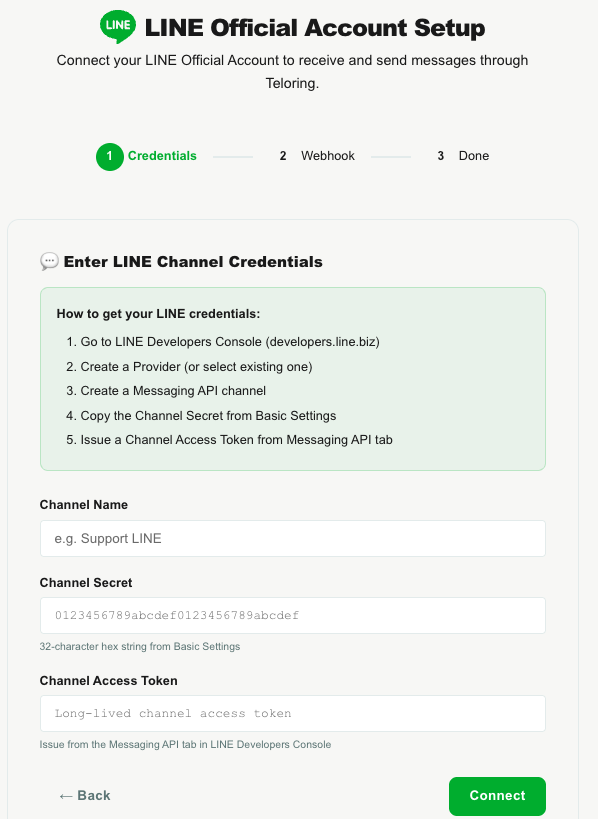
| Field | What to enter |
|---|---|
| Channel Name | A name such as Support LINE. |
| Channel Secret | The 32-character secret from Basic Settings. |
| Channel Access Token | The long-lived token from the Messaging API tab. |
Click Connect. Teloring validates the credentials and shows a bot preview card (the Official Account's display name and avatar).
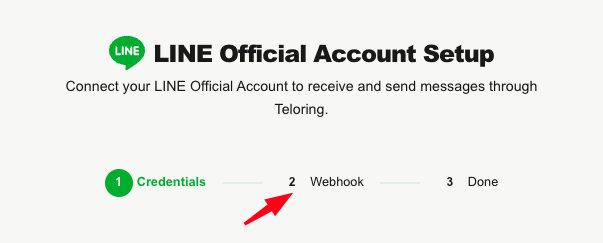
Step 2 — Configure the webhook
Teloring shows a Webhook URL. Copy it and paste it into the LINE Developers Console:
- Open your channel in the LINE Developers Console.
- Go to the Messaging API tab.
- Paste the webhook URL and click Verify.
- Enable the Use webhook toggle.
Click Finish Setup. The LINE Channel Connected! screen confirms the inbox is live.
Managing the inbox
Open the inbox from My Ring to rename it, update its credentials, or disconnect it. Disconnecting stops new messages but keeps existing conversations.
Capabilities and limits
| Capability | Detail |
|---|---|
| Two-way messaging | Receive and reply to messages with your Official Account. |
| Send media | Text, images, video, audio, and location. Documents are sent as a text message with a download link (LINE has no native file type). |
| Long messages | Text over 5,000 characters is split into several messages. |
| Agent-initiated DMs | Agents can message a user who has added your Official Account. |
Reply window and message quota
LINE distinguishes reply messages from push messages, which matters for your monthly quota:
- Each incoming message gives a short-lived reply token (valid about 5 minutes, single-use). While it's valid, Teloring replies using the free reply channel.
- After the token expires (or for agent-initiated messages), Teloring uses push messages, which count toward your Official Account's monthly message quota.
If a customer has blocked or unfriended your Official Account, a push message can't be delivered and Teloring reports it.
How LINE messages become conversations
- LINE sends the incoming message to your webhook URL (Teloring verifies each delivery's signature).
- Teloring matches the person to a contact by their LINE user ID (fetching their LINE profile when possible), or creates one.
- It reuses their open conversation on this inbox or opens a new one, stores the message, and keeps the reply token for a fast free reply.
- Real-time updates, Studio triggers, and AI Copilot fire.
A resolved conversation is never reopened. See Conversations.