Roles and Permissions
A role is a named bundle of permissions. You decide once what a role may reach, then give that role to as many agents as you like. Change the role later and everyone on it follows immediately — you never edit permissions person by person.
Open Admin → Agents, Teams & Roles → Roles & Permissions in the sidebar.
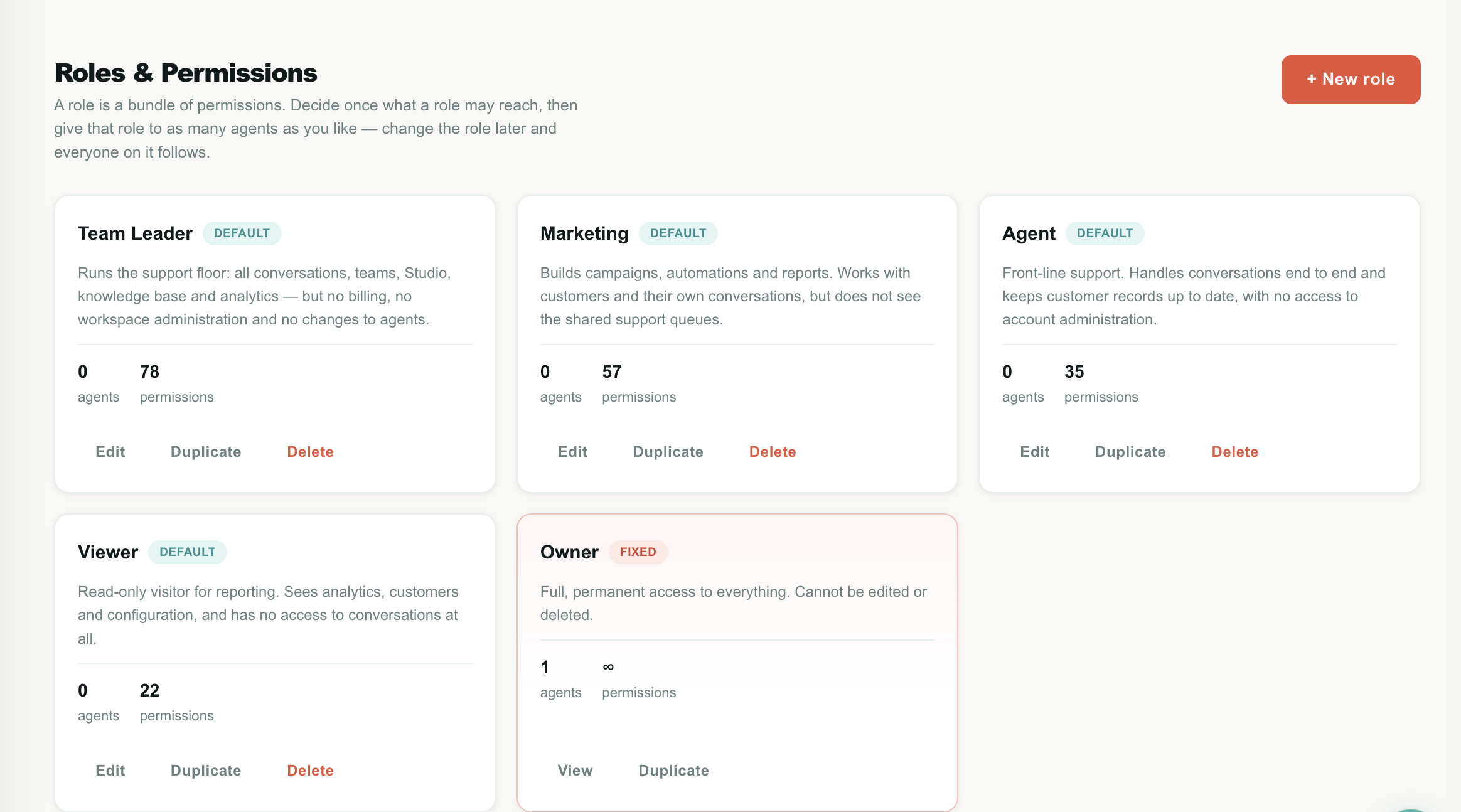
Every account defines its own roles. There is no fixed list of role names in Teloring — Owner, Team Leader, Marketing, Agent and Viewer are five starting points that ship with your account, and you can rename, re-scope, duplicate or delete any of them except Owner.
Roles belong only to the current Teloring account. A role created here is never visible in another account, and an agent can only be given a role that exists in their own account.
What a role controls
A role answers two separate questions, and they work differently. Each has its own tab in the role editor.
| Tab | The question it answers | How it is expressed |
|---|---|---|
| System permissions | May this agent reach this feature? | Every feature is split into up to four actions: Read, Create, Update, Delete. |
| Channel permissions | Which inboxes does this agent work in, and what may they do there? | 18 on/off abilities, set separately for each inbox. |
The split exists because the two are genuinely different problems. "Can this person open Analytics?" is a yes/no about a page. "Can this person see the WhatsApp waiting line but not the Email one?" is a question about places, and no amount of read/create/update/delete describes it.
- System permissions reference → every feature and what each action unlocks
- Channel permissions reference → all 18 inbox abilities, and the Future inbox rule
- Example roles and recipes → ready-made setups to copy
Key facts
| Fact | Meaning |
|---|---|
| A role is a bundle of permissions | Not a job title, not a team. |
| An agent has exactly one role | There is no stacking or combining of roles. |
| Roles are account-wide | Everyone works from the same role list. |
| Editing a role affects everyone on it | Immediately, on their very next click. No re-login needed. |
| Owner cannot be edited or deleted | Deliberately — see The Owner role. |
| A team is not a permission | Team membership affects conversation routing only. It grants and restricts nothing. |
| Department is not a permission | The Department field on an agent is a free-text label for display and search. |
| Enforced on the server | Hiding a button is a courtesy. The rule is applied again on every request. |
| Up to 50 roles per account | Enough for any real structure; if you need more, you are probably describing people, not roles. |
Teloring hides what an agent cannot use — menu items disappear, buttons vanish, queues come back empty. That is only to keep the workspace honest and uncluttered.
The real protection is on the server. Every action checks the role again before it runs, so an agent who reaches a restricted feature another way — a saved link, a browser console, the public API — is refused with a permission denied error. You never have to rely on the interface hiding something.
The Roles page
Role cards
The page opens on a gallery with one card per role.
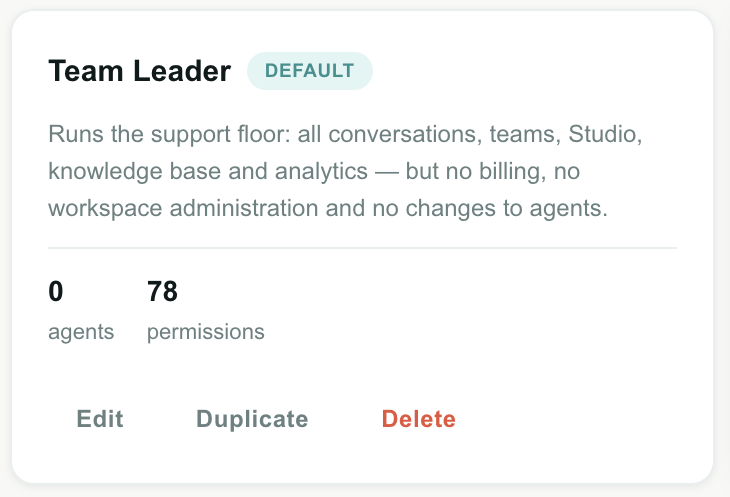
| Element | What it shows |
|---|---|
| Role name | The name agents and admins see when assigning. |
| Badge | Fixed, Default or Custom — see the table below. |
| Description | Your own note about what this role is for. It appears again under the role picker on the Agents page, so write it for the person choosing. |
| agents | How many active agents currently hold this role. Deactivated agents are not counted. |
| permissions | How many individual permissions are granted. A rough measure of how broad the role is — useful for spotting a role that has quietly grown. Owner shows ∞. |
| Edit / View | Opens the role editor. It reads View for the Owner role and for anyone without permission to change roles. |
| Duplicate | Creates an unsaved copy — Agent becomes Agent (copy) — with the same permissions, ready to adjust. The fastest way to build a new role. |
| Delete | Removes the role. See Delete a role. |
Badges
| Badge | Meaning |
|---|---|
| Fixed | The Owner role. Full access, permanently. Cannot be changed or deleted by anyone. |
| Default | One of the five roles created with your account. Fully editable and deletable — the badge only tells you Teloring made it, not you. |
| Custom | A role somebody in your account created. |
Buttons and states
| Element | What it does |
|---|---|
| + New role | Opens an empty role editor. Hidden if you do not have permission to create roles. |
| No roles yet | The empty state, with a shortcut to create the first role. You should not normally see this — every account is created with five. |
Create a role
- Open Admin → Agents, Teams & Roles → Roles & Permissions.
- Click + New role — or click Duplicate on the role closest to what you want, which is usually faster.
- Enter a Role name. This is what appears in the role picker on the Agents page, so make it obvious: Night shift supervisor, not Role 4.
- Optionally write a Description — what this role is for. It is shown under the picker when somebody assigns it.
- On the System permissions tab, tick what this role may reach.
- On the Channel permissions tab, set the Future inbox defaults first, then adjust individual inboxes that differ.
- Click Save.
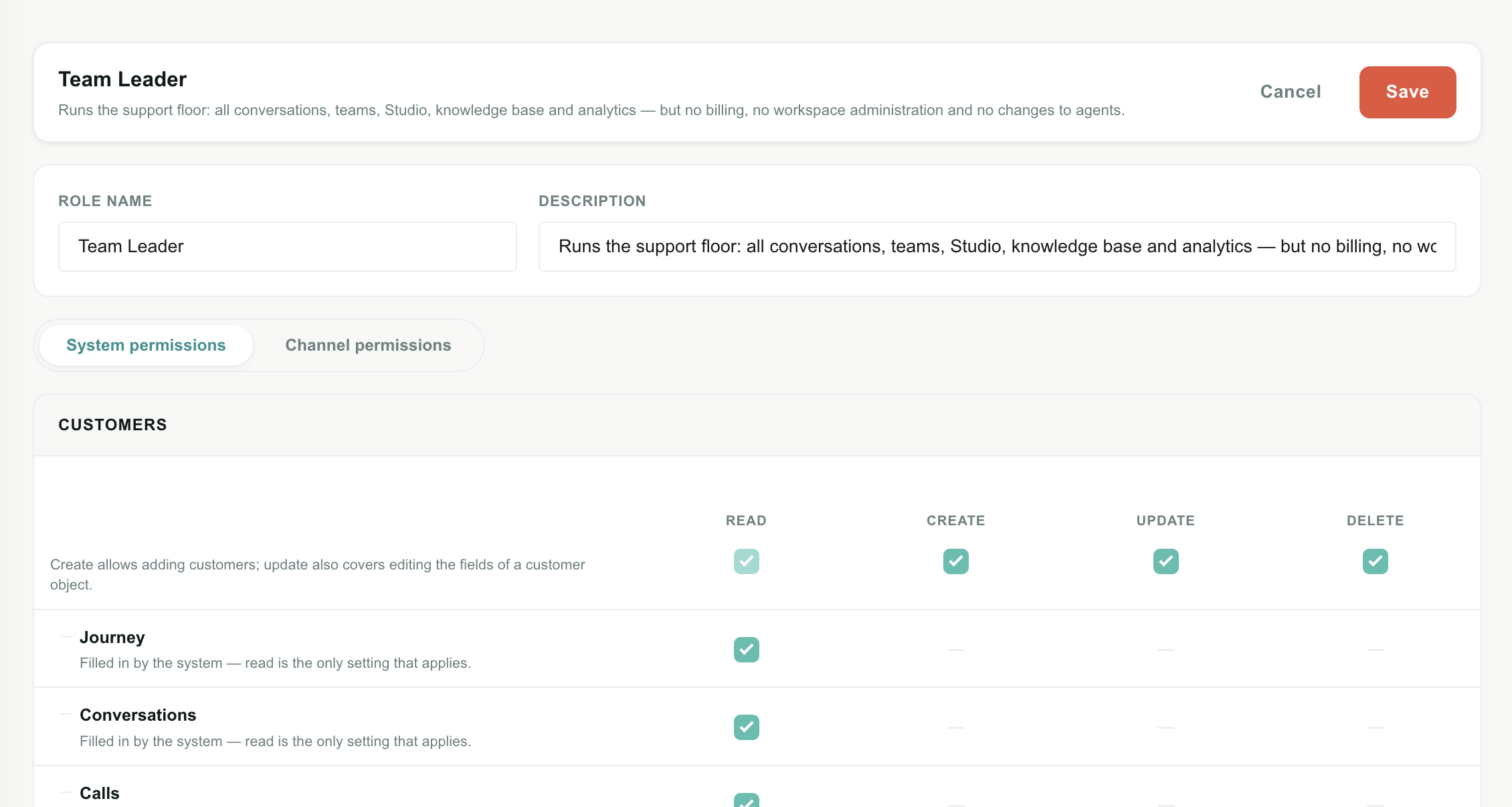
Field reference
| Field | Required | Limit | Notes |
|---|---|---|---|
| Role name | Yes | 60 characters | Must be at least 2 characters and unique in the account. Names are compared ignoring case, so Agent and agent collide. |
| Description | No | 400 characters | Free text. Shown on the role card and under the role picker on the Agents page. |
Building a role from an empty grid means ticking dozens of boxes and remembering what a support agent actually needs. Duplicating Agent or Team Leader and changing five things is faster and much less error-prone.
Edit a role
Click Edit on the card, change what you need, and click Save.
The change is immediate. Everyone on that role gets the new permissions on their next click — nobody has to sign out and back in. If you remove a permission from somebody who is using that feature right now, their next action there is refused.
If you edit the role you yourself hold, you are changing your own access. Removing Roles & permissions → Update from your own role means you can no longer open this page to put it back.
Teloring does not stop you: an account can have several roles that manage roles, and second-guessing you would be worse. If it happens, an Owner can restore it — which is the reason Owner cannot be edited.
Delete a role
Click Delete on the card.
If nobody holds the role, it is removed straight away.
If agents still hold it, Teloring will not orphan them. The dialog tells you how many there are and asks which role they should move to.
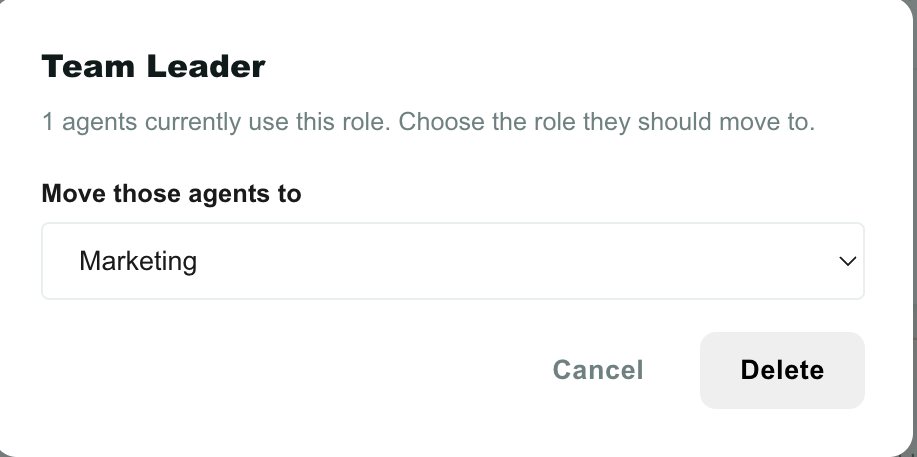
| Element | What it does |
|---|---|
| Move those agents to | The role every affected agent receives. Every other role in the account is listed. |
| Delete | Moves the agents, then deletes the role. |
| Cancel | Nothing changes. |
Deleting a role does not delete agents, conversations, customers or anything else. The affected agents keep working immediately — with their new role's permissions.
The Delete button does not appear on the Owner card, and the API refuses the request. See below.
The Owner role
Owner is the one role Teloring treats as special. It has full access to everything, permanently, and it cannot be edited or deleted by anyone — including an Owner.
That is not an oversight. Every other role can be narrowed until it can no longer reach the Roles page, so without one role that is guaranteed to work, an account could lock itself out of its own workspace with a single mistaken save. Owner is that guarantee.
| Question | Answer |
|---|---|
| Can I change what Owner may do? | No. Its card opens read-only, fully ticked, with no Save button. |
| Can I delete it? | No. |
| Can I rename it? | No. |
| Can I give Owner to more people? | Yes — as many as you like. It is an ordinary assignment on the Agents page. |
| Who has it at the start? | The person who created the account. |
| Can I take Owner away from someone? | Yes, as long as somebody else still has it. |
The last Owner is protected
Teloring refuses any change that would leave the account with no active Owner:
- moving the last Owner to another role;
- deactivating the last Owner;
- deleting the last Owner's profile.
All three are blocked with "This is the account's last Owner. Give Owner to another agent first." — from the Agents page and from Teloring support tooling alike.
Two things never count as cover: a deactivated agent, and an AI Agent. Software cannot administer an account.
One Owner is a single point of failure — somebody on holiday, somebody who left. Two Owners means the protection above never gets in your way, and somebody can always reach billing and settings.
Assign a role to an agent
Roles are assigned on the Agents page, not here.
- Open Admin → Agents, Teams & Roles → Agents.
- Click ✏️ on the agent's row — or Add Agent for somebody new.
- Pick a Role. The list contains every role in your account, and the description appears underneath so you can confirm you picked the right one.
- Save.
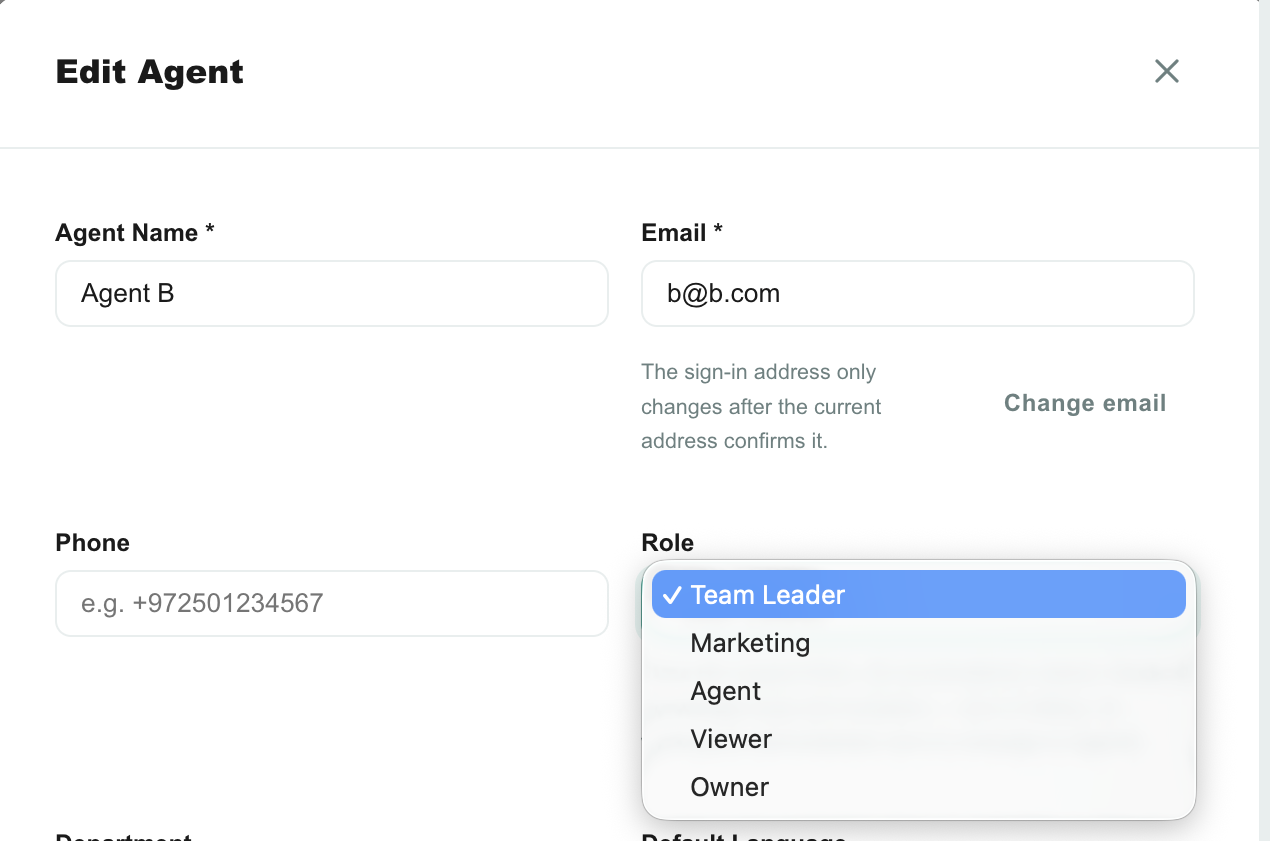
The agent's new permissions apply immediately, on their next click.
| Situation | What happens |
|---|---|
| New agent created without choosing a role | Gets the account's Agent role — the least-privilege sensible default, never "no access". |
| Agent's role is deleted | Moved to the role chosen in the delete dialog. |
| Agent is the last Owner | Cannot be moved to another role until somebody else is an Owner. |
The Role column in the agents table shows each person's role name, so you can scan the directory and see who has what. See Agents and AI Agents.
An AI Agent has no login, so a role would mean nothing to it. What an AI Agent may do is configured in its own profile — see Agents and AI Agents.
The five default roles
Every new account is created with these five. They are a starting point, not a fixed structure: rename them, re-scope them, or delete the ones you do not need.
| Role | Built for | Shape |
|---|---|---|
| Owner | The person who owns the workspace | Everything, permanently. Fixed. |
| Team Leader | A support manager who is not the account owner | Runs the floor: every inbox, every conversation, teams, Studio, knowledge base, full analytics, business hours. No billing, no agent management, no API keys, no workspace deletion. |
| Marketing | Campaigns, automations and reporting | Analytics, Studio, forms, knowledge base, customers. Handles its own conversations but sees none of the shared support queues. |
| Agent | Front-line support | Full conversation handling in every inbox except the Studio Bot and AI Agent queues. Customers read/create/update. No account administration. |
| Viewer | A read-only visitor — an accountant, a consultant, a stakeholder | Reads analytics, customers and configuration. No conversation access at all. |
For the exact grants, see the comparison tables in System permissions and Channel permissions.
The five names and descriptions above are shown in each agent's own interface language — a Hebrew console shows בעלים rather than Owner, without anything being renamed in the account.
The moment you edit a default role's name or description, it becomes your text and Teloring stops translating that field. Rename Agent to Support Rep and every agent sees Support Rep, whatever language they use. Roles you create yourself are never translated, for the same reason.
Accounts created before Roles & Permissions existed are given the same five roles the first time the page is opened, and their existing agents are matched to the closest one — the account's administrator becomes Owner, everybody else becomes Agent. Nothing is lost and no migration is needed. Review the assignments on the Agents page afterwards.
What is never restricted
Some parts of Teloring are available to every signed-in agent, whatever their role. They are not in the permission grid because switching them off would produce a broken workspace rather than a restricted one.
| Always available | Why |
|---|---|
| Dashboard (home) | The landing page after sign-in. Its content already reflects what the agent may see. |
| The Conversations menu and its queues | The menu never disappears. What appears inside each queue is controlled by Channel permissions. |
| Mine | Conversations assigned to the agent are always reachable, in any inbox. See Why "Mine" is never filtered. |
| Docs | This documentation site. |
| Their own profile | Name, photo, language, timezone, their own password and email. |
| Notifications and the bell | An agent must be able to see what they were alerted about. |
| Team Chat | Internal agent-to-agent chat. |
| The voice softphone | Making and receiving calls. Voice inbox configuration is still under My Ring, and per-agent voice access is still switched on by somebody with agent permissions. |
Where roles are enforced
Useful to know when you are testing a role, or explaining to an agent why something disappeared.
| Layer | What it does |
|---|---|
| Sidebar and menus | Entries the role cannot reach are not rendered. A whole section disappears when the role reaches none of it — no empty Admin heading. |
| Buttons and controls | Create, edit and delete controls are hidden. Some controls — a priority or label picker inside a conversation — are shown greyed out instead, so the agent can still read the current value. |
| Lists and counts | Conversation queues and their sidebar badge numbers only include inboxes the role may see. A badge never says 12 over a list of 3. |
| Search | Conversation and message search is scoped to the same inboxes as the queue being searched, so search can never surface something a list would hide. |
| Pages | Opening a restricted page by URL redirects to the Dashboard with "You do not have permission to do that". |
| Every API request | The final check. Refused with HTTP 403 and the exact missing permission, whether the request came from the workspace, a script, or the public API. |
| Audit log | role.created, role.updated and role.deleted are recorded, with who did it and what changed. See Admin → Audit Log. |
What an API key can do
An account API key is a machine credential and does not carry a role. It can reach the operational API — conversations, messages, contacts, customers, CRM records, views, Studio, forms, knowledge base — and it cannot reach agents, teams, roles, billing, settings, inbox configuration or the CRM object designer. That is fixed and not configurable.
Manage keys under Settings → API, which requires the Settings → API permission.
Limitations and what to watch for
These are real product limits today, not mistakes on your side.
| Item | What actually happens | Do this instead |
|---|---|---|
| One role per agent | An agent cannot hold two roles. There is no combining or stacking. | Duplicate the closest role and adjust it. |
| No role inheritance | Roles are flat. Editing Agent does not affect a role you duplicated from it. | Re-apply the change to each role, or keep fewer roles. |
| Managing roles is powerful | Anybody with Roles & permissions → Create or Update can grant themselves anything, because that is what editing a role means. | Give it to as few people as possible — usually only Owners. |
| You can lock yourself out of a page | Removing a permission from your own role takes effect immediately, including the Roles page itself. | Keep two Owners. Test restrictive roles on a spare agent, not on yourself. |
| No per-role working hours | A role has no schedule. It cannot grant access only during a shift. | Use business hours in Studio, or deactivate the agent. |
| No per-record permissions | Permissions are per feature and per inbox, never per individual customer, view or report. An agent who can read customers can read all of them. | Separate the data by inbox where it matters. |
| Team ≠ permission | Being in a team does not restrict what an agent can open. Teams affect routing only. | Use channel permissions for visibility. |
| A role with nothing ticked | Saves fine. Its agents can sign in, see the Dashboard, and reach nothing else. | Only useful for a suspended account. Deactivate the agent instead. |
| Deleting an inbox | Its per-inbox settings stay stored in each role, harmlessly, and vanish from the editor. | Nothing to do. |
Troubleshooting
An agent says a menu item disappeared
Their role does not grant Read on that feature. Open Admin → Agents, Teams & Roles → Roles & Permissions, edit their role, and tick Read for it. The item reappears on their next page load.
An agent can open a page but every button is missing
Read is granted, Create, Update and Delete are not. That is the intended behaviour of a read-only role — the agent can look, not change.
A queue is empty for one agent and full for another
Different roles, or the same role with different inboxes ticked. Open the role's Channel permissions tab and check the capability for that queue — See the waiting line for Waiting in line, See All Open conversations for All Open, and so on. See Channel permissions.
"Get next in line" says nothing is waiting, but the queue shows conversations
Get Next in Line is a separate permission from See the waiting line, per inbox. A role can watch a queue without being handed work from it. Tick Get Next in Line for that inbox.
Also check Teams: an agent can only be handed a conversation with no team, or one from a team they belong to.
I cannot untick "Read"
Because Create, Update or Delete is ticked on that row, and none of them can work without Read. Untick the write actions first and Read is released. See How the four actions work.
"A role with this name already exists"
Names are unique per account and compared ignoring case, so Agent and agent collide. Pick a different name or edit the existing role.
"This is the account's last Owner"
You are trying to move, deactivate or delete the only agent with the Owner role. Give Owner to somebody else first, then repeat the change.
I removed my own access to the Roles page
Ask an Owner to restore it. Owner always can, because Owner cannot be narrowed. If nobody in the account has Owner — which Teloring's last-Owner protection is designed to prevent — contact Teloring support.
An agent still has old permissions
Permissions refresh on the agent's next request; there is nothing to clear and no need to sign out. If it persists for more than a minute, confirm you saved the role and that the agent actually holds the role you edited — check the Role column on the Agents page.
Related guides
- System permissions reference — every feature and what each action unlocks.
- Channel permissions reference — the 18 inbox abilities and the Future inbox rule.
- Example roles and recipes — setups to copy.
- Agents and AI Agents — where a role is assigned to a person.
- Teams — routing, which is a separate concern from permissions.
- Conversations — the queues that channel permissions control.
- Account settings — the settings pages the permission grid refers to.