TikTok Messenger
The TikTok Messenger inbox brings direct messages from a TikTok Business account into Teloring. When someone messages your business on TikTok — from your profile, an ad, or a tiktok.me link — it becomes a conversation in the shared inbox, and agents reply from the same place they handle every other channel.
TikTok Messenger is inbound-first: you can't start a conversation with a TikTok user. A conversation opens only when someone messages your business first. It also has a strict reply window (see Capabilities). Post comments and TikTok Shop are not part of this inbox.
Prerequisites
The setup wizard shows a Before you connect checklist:
| Requirement | Detail |
|---|---|
| TikTok Business account | Messaging works only with Business accounts (not Personal or Creator) that have the messaging feature enabled. |
| Region availability | TikTok Business Messaging isn't available in every country. If your region is unsupported, the connection fails with a clear error. |
| 48-hour reply window | You can reply only within 48 hours of the customer's last message, and at most 10 messages per window. A new incoming message resets both. |
| Inbound-only | You cannot start a conversation — customers must message you first. |
| Inbox permission | Connecting the inbox needs My Ring → Create. See Roles and Permissions. |
Connect a TikTok inbox
Open My Ring, click the TikTok Messenger icon, and choose Add.
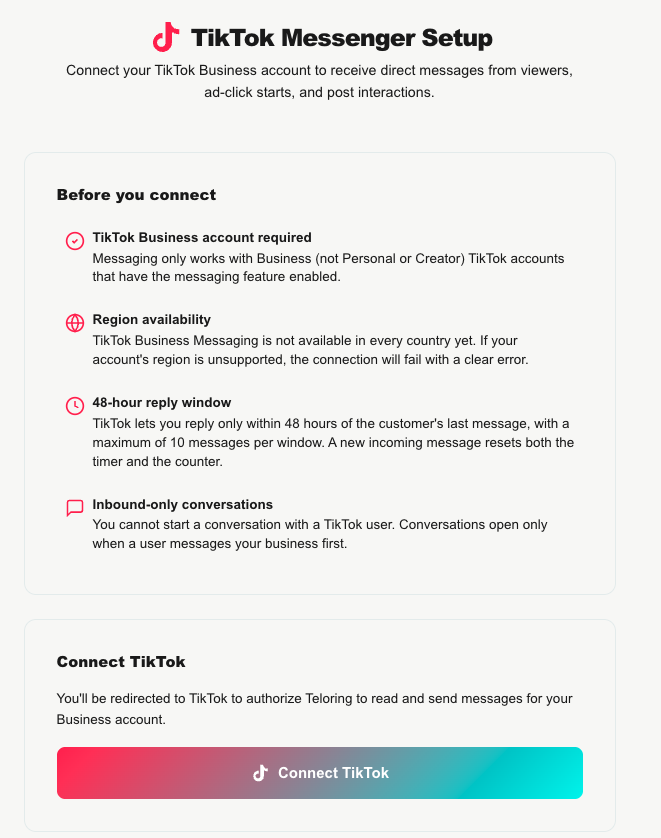
- Review the Before you connect checklist.
- Click Connect TikTok. A window opens on TikTok, where you authorize Teloring to read and send messages for your Business account.
- When you approve, the window closes and Teloring opens the inbox's edit page.
Re-authorizing the same TikTok account later updates the existing inbox rather than creating a duplicate.
If the feature is still awaiting approval for your account, the Connect button is disabled with a notice that TikTok Messenger is in staging.
The edit page
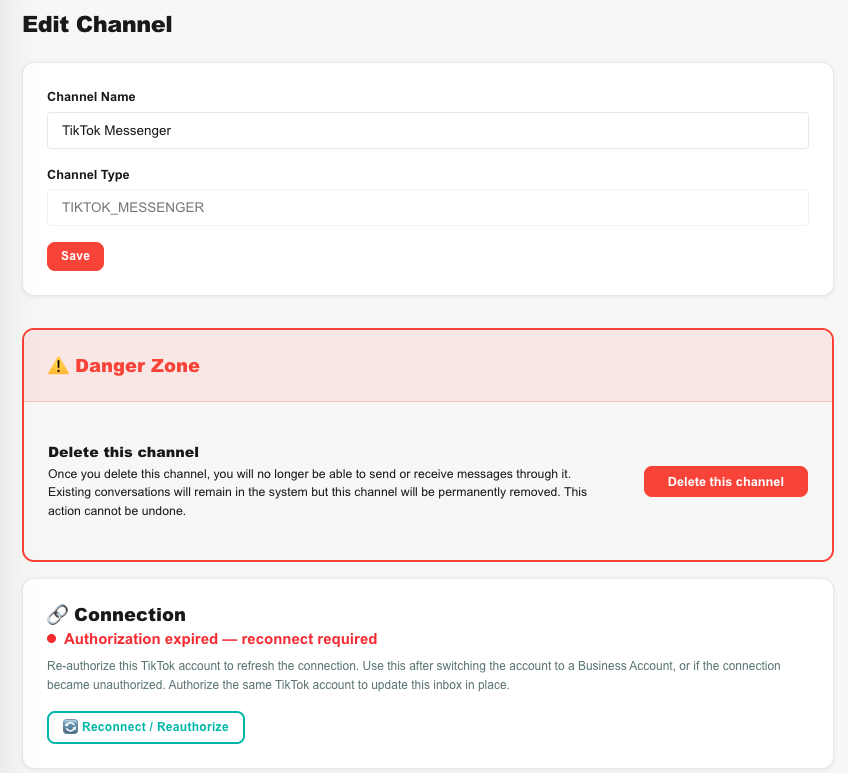
The TikTok edit page has three cards on top of the inbox name:
Connection
Shows the connection status with a colored dot:
| Status | Meaning |
|---|---|
| Connected | The inbox is authorized and working. |
| Authorization expired — reconnect required | Re-authorize to restore it. |
| Not a Business account | Switch the TikTok account to a Business account, then reconnect. |
| Region not supported | TikTok messaging isn't available for this account's region. |
| Disconnected | The inbox has been disconnected. |
A 🔄 Reconnect / Reauthorize button re-runs the TikTok authorization.
Capabilities
A live check of what this connection can actually do, with ✅ / ❌ for each:
| Capability | Meaning |
|---|---|
| Account connected | Teloring can reach the TikTok Business account. |
| Receive incoming messages | Incoming DMs are delivered. |
| Send replies via API | Whether Teloring can send replies (TikTok restricts sending to Business accounts). |
| Sync / list conversations | Whether Teloring can list conversations from TikTok. |
| Webhook delivery registered | Incoming-message delivery is set up. |
This panel is the honest truth for your specific account — for example, a personal account can still receive messages but not send replies until it's switched to a Business account.
tiktok.me Link Builder
Create trackable tiktok.me links. Add a tracking label (ref) — like instagram_bio — and Teloring builds a link such as https://tiktok.me/@yourname?ref=instagram_bio. When someone opens that link and messages you, the ref appears on the conversation, so you can see which source (Instagram bio, email footer, an ad, and so on) drives conversations. A Link performance table shows how many conversations each ref produced.
Your TikTok username appears here after the first customer message arrives; then you can build links.
Capabilities and limits
| Capability | Detail |
|---|---|
| Text replies | Up to 6,000 characters; can quote-reply to a customer's text message. |
| Typing & read indicators | Shown to the customer as agents type and open the conversation. |
| Send images | JPG or PNG, up to 3 MB. A message can be either text or an image, not both. Image support varies by market. |
| Receive | Text, images, video, shared posts, emoji, stickers, reactions, and template cards. |
| 48-hour / 10-message window | You can reply for 48 hours after the customer's last message, up to 10 messages. A new incoming message resets both the timer and the count. The composer shows the remaining time and count, and banners explain when the window has expired or the limit is reached. |
| Inbound-only | No "new conversation" button — customers must message you first. |
How TikTok messages become conversations
- A customer messages your business on TikTok (or arrives via an ad or a
tiktok.melink). - Teloring matches them to a contact or creates one, and opens or reuses their conversation on this inbox.
- If they came from an ad or a link, the conversation shows the source (and the
ref). - Real-time updates, Studio triggers, and AI Copilot fire.
A resolved conversation is never reopened — a later message starts a new one. See Conversations.